Deck Builder
There is no separate builder page. You edit a deck on its own page: open a deck and tap the lock, or click + Build on the Decks page to start from nothing.
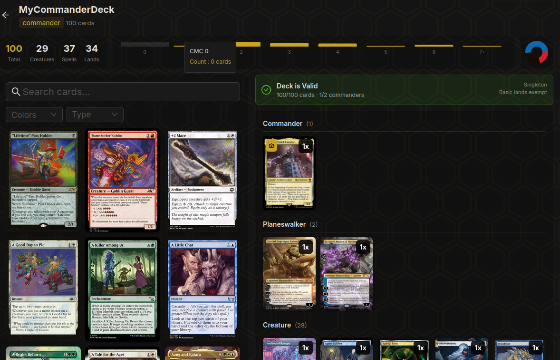
Locked and unlocked#
On your own decks, and decks you collaborate on with edit rights, a lock sits in the header and in the filter bar that sticks to the top as you scroll. Tap it to switch between the two.
- Locked hides the quick buttons on cards (+, − and remove), so you can scroll and browse without changing anything by accident. Every action is still in a menu: the ⋯ on a card (tags, change art, set as commander, sideboard, remove), the commander slot's menu, and Settings and Merge in the deck's ⋯ menu. Using one unlocks the deck.
- Unlocked shows the quick buttons. − on the last copy removes the card. Removing a card shows an undo toast.
+ Add Cards and Basics are always there and unlock the deck too. The lock remembers its state for each deck on that device. A deck made with + Build or an import opens unlocked.
Collaborators who can only suggest see Suggest Cards instead of a lock. It opens the same card search, and what you pick goes to the owner as a suggestion.
Finding cards#
Click + Add Cards to open the search panel. Search matches name, oracle text and type line, so "draw a card" and "goblin" both work. Filters narrow it down:
- Colours and colour identity
- Mana value: at most, exactly, or at least
- Type, subtype and keyword
- Rarity, set, and a collection of yours
- Game Changers only, for checking what's pushing your bracket
Sort under the filters ranks what you see before you type anything. On a Commander deck, For ⟨your commander⟩ puts the cards most often played with it on TableCommander first, with "in 64% of decks" under each one, and Synergy favours cards played with it far more than in Commander decks generally. On a 60-card deck it's Popular in ⟨format⟩. Popular is the overall order. The numbers update nightly. Commanders and formats with only a few decks fall back to the popular order, and typing a search switches to name matches.
Click a card to add one. With the deck unlocked, the + and − on each card adjust the count. − on the last copy, or Remove, takes the card out, and the undo toast brings it back. Choosing a different printing for a card shows the current price of each print, foil and non-foil, so you can see what the art swap costs before you make it.
Selecting several cards
On a deck you can edit, Ctrl click a card (Cmd click on a Mac) to select it, and again to drop it. Shift click selects every card between the last one you clicked and this one, in the order they show on screen. Selected cards get a gold outline, in grid and list view alike. On a phone or tablet, tap Select next to the card count and then tap cards to select them.
While you're selecting, a bar under the view row shows how many are selected, with Select all for every card the filters show, and these actions:
- Move to sideboard, or Move to deck when the selection includes sideboard cards
- Add one more of each, the same as tapping + on each card (tokens are skipped)
- Favourite these arts stars the art each card is showing as your favourite printing, the same star as in the print picker
- Remove from deck, with an undo toast
The same actions are in a menu on any selected card's ⋯, and on a right click (or long press on touch) of any card. Right clicking a card you haven't selected adds it first. While you're selecting, cards you haven't selected show no ⋯, so a menu always acts on the whole selection. Clear or Esc ends the selection, and so does removing or moving the cards or leaving the page.
Basic lands
Basics beside + Add Cards (also on the Lands section and in the ⋯ menu) tops the deck up with basics. Set how many lands you want in total, 37 for Commander and 24 for a 60-card deck to start with, and the missing ones are split by the mana symbols in your spells, counting the basics already in the deck. Commander decks only get basics in the commander's colours, or Wastes for a colourless commander. Each row can be changed before you add them, and a warning shows if the lands would take the deck over its format size.
Tokens
Adding a card also adds the tokens it makes, in a Tokens section outside the deck count, so they're ready to create in game. Removing the card removes those tokens too, unless another card in the deck still makes them. Tokens you added yourself stay put. Unused on the Tokens section clears every token no card in the deck makes, including ones you added yourself and ones left over from older edits.
To browse every token and emblem, open Cards > Tokens. Show switches between tokens, emblems and TableCommander, the tokens we made for cards that never got an official one (Banana, Zeppelin, Kelp and friends). Click a token to see it full size. Want one added? Request a Token at the top of the Cards page asks for the name, the card that makes it (pick it from the suggestions so the topic links to the card) and its stats, with optional art you made or are allowed to share. It opens its own topic in Cards & Content on the forum, where you can follow it.
The command zone#
For Commander formats the command zone sits above the card list. Set your commander there, add a partner or background with Set Partner, and pick a companion if you're running one. Oathbreaker gets a signature spell slot, Pendragon a Doctor slot. Once a commander is set, cards outside its colour identity are flagged in the list, and so is a companion that doesn't fit it.
Counts and value#
Two rows of chips sit above the card list: one counts each card type, with its type symbol, the other counts commons, uncommons, rares and mythics in the main deck. Click a chip to filter the list to that type or rarity, click again to clear. Prices, next to the Sort and Highlight menus, shows the deck's total, the average per card, and each card's price on its tile or row. It remembers its setting.
Sort beside it orders the cards inside each type section: Added (the order they went in), Name, Mana, Color, or Price. Click the active chip again to reverse it; the arrow shows which way it's running. It sticks until you change it.
The Highlight menu outlines each card so patterns jump out: Color rings a card in its colors (multicolor cards split the ring into a solid segment per color, lands use their color identity) and Rarity uses the rarity colors, filling the rarity chips above the list in the same colors so they work as the key. In list view each color becomes a solid bar at the left of the row, with the row tinted to match. Sort by Color with the Color highlight on and each section lines up as a rainbow.
Deck Shape#
The strip under the deck name counts lands, ramp, draw, removal, protection and board wipes and shows each against a target range. It's a rough guide, not a rule, but a bar in the red is usually worth a second look. Click a chip to list the cards counted in it. From that list, Find more points the card search at that role.
Legality#
The Legality slice checks the deck against its format as you edit: size, singleton, colour identity, banned cards, and format-specific rules like PDH's uncommon commander or Dandân's fixed core. Issues stop the deck being legal. Warnings don't.
Legality only matters if the table is set to Strict. A Relaxed table lets you bring anything, so a deck with issues is still playable among friends.
Deck settings#
The Settings button opens name, description, format, privacy (private or public), and Card Art. Archetypes… in the ⋯ menu picks up to two from a fixed list, like Voltron or Aristocrats. They show on the deck and let people filter Public decks by playstyle. Labels… sits next to it for supporters. Card Art picks which printing's image is used for every card: the default, the latest printing, or the original. Apply favourite arts under it swaps every card you have starred a favourite printing for to that art, and leaves the rest alone. New decks and imports pick favourites up on their own; this is for decks built before you starred them. For Commander decks you can also override the estimated bracket here, or clear an override and go back to the estimate. See Bracket Estimates.
Card changes save as you make them. Settings save when you click Save.
Tags#
Supporters can tag cards within a deck (removal, wincon, cut candidate, whatever you like) and filter the list by tag. Tags come along with JSON exports.
Notes#
The Notes slice is a plain text box for the deck. Cards to try, matchup notes, why that one card is there. It has its own save button.
Collaborate#
Collaborate adds a friend as an editor. Both of you can change the deck and it stays in the owner's library. A collaborator can leave from the same menu, or save a copy to their own decks.
Playtest#
The ⋯ menu has Playtest: pick another of your decks in the same format and you're in a two-seat game controlling both sides. Good for goldfishing and for checking a combo actually works before you take it to a table. Switch Opponents to Any deck (Kitchen Table) to play decks from different formats against each other, say Legacy against Modern, at 20 life with no format checks. With a Commander deck you can also switch the mode to Planechase, which adds the shared planar deck, Two-Headed Giant, which seats four of your decks as two teams, or Archenemy, where your deck is the villain against three defender decks. Click a player's tab, or their header in the four-seat grid view, to play as them.